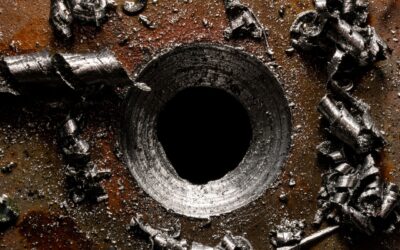
To unclog a meat grinder, reverse the auger direction if your model has a reverse function, then disassemble and manually remove the blockage. If reverse isn’t available, unplug the grinder, take it apart, and extract the jammed material from the cutting plate and knife. A clog usually happens when meat fibers, sinew, or fat wrap around the auger or block the plate holes, so clearing those parts is the first step. Knowing how to unclog a meat grinder correctly prevents damage to the motor and blades.
Pros
- Dual bowls eliminate cross-contamination and allow simultaneous prep of different foods
- Full-copper motor rated for professional use with extended service life
- Comprehensive safety features including automatic blade stopping and overheating protection
- Versatile 2-speed motor handles soft vegetables to tough meats and frozen ingredients
- Excellent value at under $35 with high customer satisfaction ratings
Cons
- Overheating protection requires cooldown periods during extended use sessions
- Limited bowl capacity at 8 cups per bowl for larger batch cooking needs
- Learning curve required to understand which bowl and blade combination works best for each task
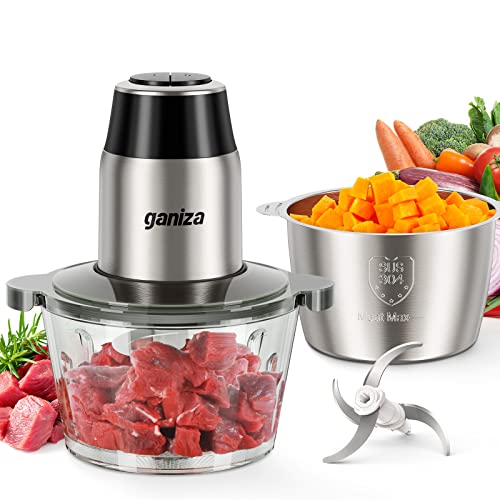
The Ganiza 450W food processor is a dual-bowl electric chopper designed for busy families and home cooks who want to eliminate tedious manual prep work. Whether you're grinding meat, chopping vegetables for weeknight dinners, or processing nuts and frozen fruit, this 2-in-1 system delivers professional-grade results at a fraction of the cost of separate appliances.
The standout feature is undoubtedly the dual-bowl design with 8-cup glass and stainless steel bowls. This allows you to keep meat preparation completely separate from vegetable prep, addressing a key hygiene concern for many households. The 450W full-copper motor is certified for professional use and reportedly lasts 3 times longer than standard motors, while the 2-speed settings adapt to different food textures and densities with ease.
Build quality reflects the competitive price point. The motor feels solid and the bowls are made from durable materials, though the overall construction is more utilitarian than premium. The spring-loaded blade design is a genuine safety feature that stops rotation immediately when the motor is disengaged, and the built-in overheating protection prevents damage during intensive use.
The main limitation is the overheating protection system, which requires brief cooldown periods if the motor runs continuously. Additionally, the 8-cup bowl capacity may feel limiting for large families doing batch cooking. Despite these minor drawbacks, the combination of safety features, dual-bowl convenience, and powerful motor makes this an excellent choice for everyday meal prep.
Verdict: The Ganiza food processor delivers impressive functionality and safety features at an unbeatable price. It's particularly well-suited for families who want to streamline cooking without investing in multiple appliances or premium brands. Recommended for anyone tired of manual chopping and ready to reclaim time in the kitchen.
Motor and Power: 450W full-copper motor, 2-speed settings, professional-grade certified
Bowls: 8-cup glass bowl and 8-cup stainless steel (SUS 304) bowl included
Blades: 2 complete sets of upgraded S-shaped stainless steel blades for varied cutting tasks
Safety Features: Automatic stopping design, spring-loaded blades, overheating protection system, BPA-free construction
Cleaning: Removable blades and bowls for easy hand washing
Warranty and Support: Overheating protection system built for long-term durability and safety
Ideal For: Grinding meat and fish, chopping vegetables and onions, processing nuts and seeds, blending frozen fruit, making salsa and guacamole, preparing baby food, Thanksgiving and holiday meal prep
Perfect For: Busy families with multiple dietary preferences, parents managing separate kids' meals, home cooks seeking to reduce prep time, anyone with arthritis or hand strength limitations
Recommended Tasks: Use the glass bowl for softer vegetables and fruits, reserve the stainless steel bowl for meat and aromatic ingredients like onions and garlic. The 2-speed motor handles quick 5-10 second pulses for chunky textures and longer runs for fine mincing.

Pros
- Exceptional power and speed processes large quantities of meat efficiently without clogging
- Multiple grinding plates and sausage tubes deliver professional results for bratwurst, chorizo, meatballs, and burgers
- Robust stainless steel design with copper motor provides long-lasting reliability and food safety
- Safety features including overload protection and thermal shutoff give peace of mind during use
- Highly rated by customers (4.5/5 stars) with thousands of verified reviews confirming quality and performance
Cons
- Hand washing required, parts cannot go in dishwasher which adds cleanup time
- Heavier motor may produce noise during operation typical of powerful grinding machines
- Requires proper meat sizing before grinding for optimal performance and to avoid jams
The HOME Electric Meat Grinder is a powerful 3-in-1 kitchen appliance designed for home cooks, hunters, and sausage enthusiasts who want fresh ground meat and homemade processed foods. With its impressive 3200W maximum power and robust stainless steel construction, this grinder handles everything from beef and pork to venison and chicken with ease.
Performance is where this grinder truly shines. The dual stainless steel blades combined with three interchangeable grinding plates (2mm, 5mm, 7mm) deliver consistent results whether you're making fine sausage, coarse burger meat, or traditional kibbeh. The three included sausage stuffer tubes add another dimension, letting you create bratwurst, chorizo, and chicken sausages in minutes. Users consistently praise the speed and efficiency, especially during peak hunting season when processing bulk quantities.
Build quality is solid throughout. The food-grade stainless steel body paired with a 100% pure copper motor ensures both safety and longevity. Smart safety features including automatic overload protection and thermal shutoff prevent damage from overheating or jamming. The reverse button unclog function is a practical touch that prevents frustration during heavy use.
The main drawback is that all removable parts require hand washing and careful drying with a soft cloth, rather than dishwasher convenience. Additionally, the powerful motor can be loud during operation, which is typical for machines in this power class. Proper meat sizing before grinding is also important to avoid jams and ensure optimal performance.
Overall, this is an excellent value for anyone serious about grinding meat at home. The combination of power, versatility, safety features, and customer satisfaction makes it a worthwhile investment for families, hunters, and cooking enthusiasts who want control over their ground meat quality and sausage ingredients.
Power and Performance
Motor Power: 3200W Max Locked Power
Motor Type: 100% Pure Copper
Grinding Plates: 3 (2mm, 5mm, 7mm sizes)
Cutting Blades: 2 Sharp Stainless Steel
Sausage Tubes: 3 Sizes Included
Materials and Safety
Body Material: Food-Grade Stainless Steel
Safety Features: Overload Protection, Thermal Shutoff, Locking Knob
Reverse Function: Yes, for unclogging
Dishwasher Safe: No, hand wash only
Functionality
Grinding: Beef, pork, chicken, venison, fish
Sausage Making: Bratwurst, chorizo, chicken sausage
Additional Uses: Meatballs, burger patties, bolognese sauce, kibbeh, vegetable processing
Who Should Buy This Grinder?
This model is ideal for serious home cooks, hunters processing game meat, sausage enthusiasts, and families who regularly prepare ground meat dishes. If you make sausages, burgers, or meatballs more than occasionally, the investment pays for itself in quality and convenience.
Key Considerations
Ensure you have adequate counter space, as this is a substantial machine. Plan for hand washing and drying time after use. Cut meat to appropriate size before grinding to prevent jams. The powerful motor means noise during operation, so consider timing of use if you have light sleepers nearby.
Maintenance Tips
Always unplug before disassembling parts. Clean immediately after use while residue is fresh. Dry all stainless steel components thoroughly to prevent water spots. Store the three grinding plates and sausage tubes in a dry location to maintain sharpness and prevent rust.

Pros
- Powerful 0.5 HP motor delivers consistent grinding performance for regular home and small-batch commercial use
- Comprehensive accessory package includes multiple plates and sausage-making tubes for diverse grinding needs
- Exceptional customer satisfaction with high ratings reflecting real-world reliability and durability
- Extensive warranty coverage and lifetime support demonstrates manufacturer confidence and commitment to customers
- Stainless steel design resists corrosion and maintains hygiene standards for food preparation
Cons
- Not suitable for grinding bones, limiting its use for some types of meat processing
- 0.5 HP motor is lower-powered than larger models, so it may require longer processing times for very large batches
- Requires regular disassembly and cleaning to maintain optimal performance and food safety
The LEM BigBite #8 is a professional-grade electric meat grinder designed for home cooks, hunters, and meal preppers who want commercial-quality results without the commercial price tag. With a 0.5 HP motor and 2-inch throat, it delivers reliable performance for regular grinding needs and small to medium batch processing. This grinder is built for anyone serious about fresh ground meat, whether you're making burgers, sausages, or processing game.
Performance and grinding capacity shine with this model, processing approximately 7 pounds of meat per minute. The stainless steel construction paired with a noise-dampening design means you get powerful grinding with minimal disruption to your kitchen environment. The included accessories, three grinding plates, knife, stomper, and sausage stuffing tubes, provide versatility for different texture preferences and sausage-making projects, making it a complete grinding solution out of the box.
Build quality reflects LEM's commitment to durability and longevity. The permanently lubricated motor eliminates the need for regular maintenance, while stainless steel components resist corrosion and maintain food safety standards. The grinder disassembles easily for thorough cleaning, and the comprehensive five-year warranty plus lifetime customer support demonstrates the manufacturer's confidence in their product and commitment to customer satisfaction.
One limitation to note is that this grinder is not designed for bones, which narrows its application compared to some heavy-duty models. Additionally, the 0.5 HP motor, while adequate for most home use, may require longer processing times for very large batches compared to more powerful alternatives. Regular disassembly and cleaning is necessary to maintain optimal performance and food safety standards.
The LEM BigBite #8 represents excellent value for home and small-batch grinding needs. Its combination of commercial-grade construction, reasonable processing speed, comprehensive accessories, and exceptional warranty coverage makes it a smart investment for anyone serious about fresh ground meat preparation. Highly recommended for hunters, bulk meal preppers, and home cooks seeking reliability and professional results.
Motor and Power: 0.5 HP electric motor with permanently lubricated design for maintenance-free operation.
Grinding Capacity: Processes approximately 7 pounds of meat per minute, suitable for small to medium batch processing.
Construction: Commercial-grade stainless steel body and components for durability and food safety.
Throat Size: 2-inch throat diameter for efficient meat feeding and processing.
Included Accessories: Three grinding plates for texture variety, grinding knife, meat stomper, and sausage stuffing tubes for versatile applications.
Design Features: Noise-dampening design for quieter operation in home kitchens. Disassembles easily for cleaning and maintenance.
Warranty and Support: Five-year factory warranty with lifetime customer support and availability of replacement parts.
Limitations: Not designed for grinding bones. Requires regular cleaning and disassembly for optimal performance.
Who Should Buy: The LEM BigBite #8 is ideal for home cooks and hunters who regularly process meat, meal preppers buying in bulk, and anyone interested in making fresh sausages or pet food from quality ingredients. It's the right choice if you want commercial-grade reliability without the commercial-grade price or space requirements.
What Makes It Stand Out: Unlike budget grinders, this model combines professional-grade stainless steel construction with a powerful motor and comprehensive warranty. The included sausage-making tubes and multiple grinding plates provide versatility that budget models often lack. The noise-dampening design ensures you can grind without disturbing your household.
Important Considerations: This grinder is not designed for bones, so it's best suited for muscle meats, game, and prepared cuts. The 7 pounds per minute capacity is excellent for home use but may feel slow if you're processing very large quantities regularly. Plan for regular cleaning and disassembly to maintain performance and food safety standards.
Long-Term Value: With a five-year warranty and lifetime support, plus the availability of replacement parts, this grinder is built for long-term ownership. The stainless steel construction resists corrosion, and the permanently lubricated motor eliminates maintenance hassles. For serious home cooks and hunters, the investment pays dividends over years of reliable service.
Pros
- Exceptional power and speed, grinding 220-260 lbs per hour depending on meat type and plate selection
- Innovative quad air cooling design keeps motor running cool for extended grinding sessions without performance loss
- Comprehensive all-in-one package eliminates need for separate sausage stuffer, burger press, and other meat processing tools
- Professional Size #12 grinding head produces finer, more uniform results than standard Size #5 or #8 home grinders
- Versatile enough for ground meat, sausage making, kubbe preparation, and even soft bone grinding for pet diets
Cons
- Aluminum grinding head and plates require hand washing with mild detergent rather than dishwasher cleaning, adding maintenance time
- Heavy-duty power and size make it a counter space commitment, measuring 19 inches long and weighing 13 pounds
- Learning curve required to master different grinding plates and speeds for optimal results with various meat types
The STX Turboforce II 4000 is a professional-grade electric meat grinder built for home cooks, butchers, and pet food enthusiasts who demand serious grinding power. This Size #12 unit sits well above entry-level grinders in both capability and versatility, making it ideal for anyone regularly processing large quantities of meat or wanting restaurant-quality results at home.
The standout feature is undoubtedly the patented Quad Air Cooling System combined with 2000 watts of peak output power. This combination allows the grinder to process 220-260 pounds of meat per hour without overheating or losing performance. The three-speed system gives you flexibility for different meat textures, and the reverse function helps clear jams. Uniquely, this grinder can handle soft bones like chicken and rabbit, plus it supports BARF diet preparation for pets, expanding its usefulness beyond traditional grinding.
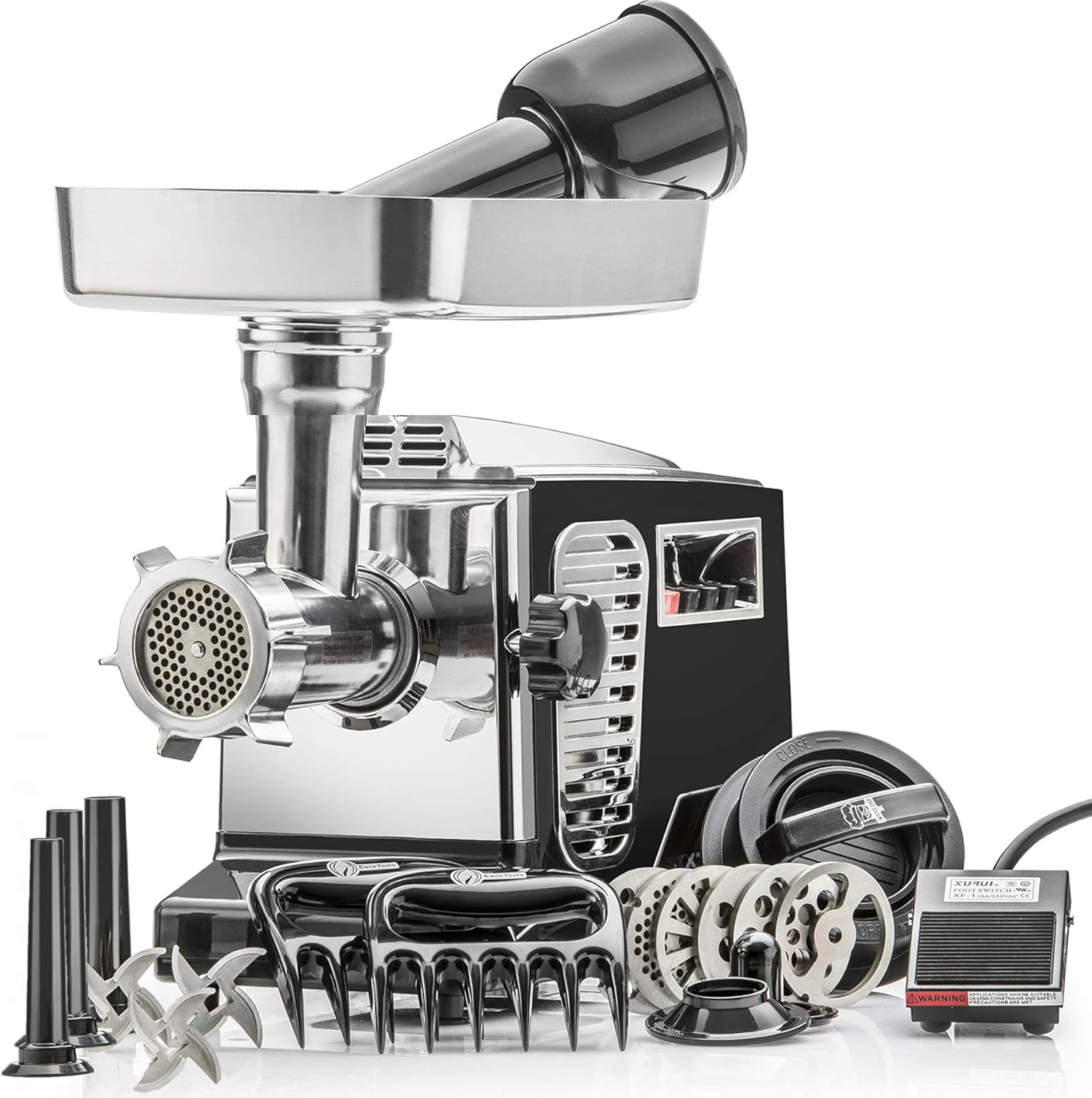
Build quality reflects its professional heritage. The grinding head is constructed from polished cast aluminum rather than coated materials, with stainless steel blades that resist corrosion. The comprehensive package includes six grinding plates in various sizes, three sausage tubes, a kubbe attachment for Middle Eastern dishes, a burger press with waxed transfer sheets, meat claws, and a palm pusher. This all-in-one approach eliminates the need to purchase separate accessories.
The main drawback is maintenance. The aluminum components require hand washing with mild dish soap rather than dishwasher cleaning, which adds to prep and cleanup time. The unit also demands significant counter space at nearly 19 inches long. Additionally, mastering the different plate sizes and speed settings takes some experimentation to achieve optimal results with various meat types.
The STX Turboforce II 4000 delivers exceptional value for serious meat processing enthusiasts. Its combination of power, cooling technology, bone-grinding capability, and comprehensive accessory package makes it the most versatile home grinder available at this price point. Backed by a three-year warranty and U.S.-based support, this is a worthy investment for anyone who grinds meat regularly.
Motor and Power: 2000 watts peak output, 110-120 volts, 60 Hz, with safety circuit breaker and three-speed system (high, low, reverse)
Grinding Capacity: Size #12 professional-grade unit, 2.5-inch diameter output for ground meat, 2-inch diameter feed tube, grinds 220-260 lbs per hour depending on meat type
Grinding Plates: 6 total plates including 4mm, 8mm, 10mm, 12mm, wagon wheel, and sausage stuffing plates
Cutting Blades: 3 stainless steel 304 food-grade blades
Accessories Included: Polished aluminum meat tray (9.75 x 7.25 x 2 inches), foot pedal, 3 sausage tubes (0.5, 0.625, 0.75 inch), kubbe attachment, burger-slider press with waxed transfer sheets, meat claws, palm meat pusher, and instruction manual
Dimensions: 19 inches length, 8 inches width, 14 inches height
Weight: 13 lbs assembled, 14 lbs shipped
Warranty: 3-year manufacturer warranty
Who Should Buy This Grinder: Home cooks who regularly grind meat in quantities of 10+ pounds, sausage makers, people following BARF diets for pets, and anyone wanting professional-quality results without commercial equipment costs. This unit justifies its investment through heavy use and versatility.
Who Should Look Elsewhere: Occasional users grinding small amounts of meat may find the counter space and maintenance requirements excessive. Those wanting dishwasher-safe components should consider smaller, fully stainless steel models instead.
Key Features to Understand: The Size #12 designation refers to the professional grinding head diameter, which produces finer, more consistent results than smaller Size #5 or #8 units. The Quad Air Cooling System is engineered specifically to prevent motor burnout during extended use. The ability to grind soft bones sets this apart from standard grinders and expands its utility significantly.
Maintenance Tips: Always hand wash the aluminum grinding head and plates with mild dish soap and hot water, then towel dry immediately. The stainless steel blades can go in the dishwasher. Store all components in a dry location to prevent moisture buildup. The included palm pusher has a hollow top for convenient sausage tube storage.
Getting the Best Results: Start with the appropriate plate size for your desired grind texture, use the high-speed setting for standard grinding, and engage reverse if meat gets stuck. Chill your meat before grinding for cleaner, finer results. Experiment with different plate combinations to find your preferred texture.

Pros
- Exceptional grinding capacity and speed compared to smaller size #5 and #8 grinders on the market
- Comprehensive accessory bundle eliminates need for separate sausage stuffer, burger press, and meat claws
- Heavy-duty aluminum and stainless steel construction built for reliability and longevity with 3-year warranty
- Versatile 3-speed system handles both grinding and sausage stuffing with dedicated low speed option
- Well-established product with over 15 years on market and 25,000+ units sold annually, proving durability
Cons
- Not designed for grinding bones, tendons, or non-meat items, limiting versatility compared to some competitors
- Aluminum grinding head and plates require hand washing and careful drying to prevent corrosion, adding maintenance time
- Weighs 12 lbs and requires counter space at 19 x 8 x 14 inches, making it less portable than compact models
The STX Turboforce 3000 Series is a heavy-duty home meat grinder designed for serious home cooks, hunting enthusiasts, and anyone who wants to process meat in bulk. This is not a compact kitchen gadget but rather a professional-grade machine built to handle substantial grinding tasks while remaining suitable for household use rather than commercial operations.
What sets this grinder apart is its Size #12 grinding head with 2-5/8 inch diameter plates, delivering 180-240 lbs of meat per hour depending on meat type and preparation. The 3000W motor with Advanced Variable Intake (AVI) auger technology combines with a spacious 3 lb capacity hopper to minimize refilling stops. The 3-speed control system offers dedicated high speed for grinding and low speed for sausage stuffing, plus reverse function for unclogging or cleaning.
Build quality is solid with polished cast aluminum grinding heads and 304-grade stainless steel cutting blades. The comprehensive accessory package includes 5 grinding plates, 3 sausage tubes, a kubbe attachment, burger press, and meat claws, making this a true all-in-one solution. However, the aluminum components require hand washing and careful drying rather than dishwasher convenience, adding some maintenance responsibility.
The main limitation is that this grinder is strictly for meat, excluding bones, tendons, vegetables, and other items despite its power. Results grinding bones are inconsistent, so buyers should not expect this capability. At 12 lbs and 19 inches deep, it requires dedicated counter or storage space and is not a portable option.
For home meat processors seeking professional-grade performance with versatility and proven reliability, the Turboforce 3000 delivers exceptional value. The 15-year market presence and annual sales exceeding 25,000 units demonstrate customer satisfaction and durability, backed by a 3-year warranty.
Motor and Power: Locked Motor Wattage: 3000W, Operating Load: 800-1200W, Voltage: 110-120V AC, 60 Hz
Grinding Performance: Capacity: 180-240 lbs per hour, Grinding Head Size: #12, Grinding Plate Diameter: 2-5/8 inches, Hopper Capacity: 3 lbs, Hopper Opening: 2-1/8 inches diameter
Included Components: 1 Size #12 polished aluminum grinding head, 3 stainless steel cutting blades (304-grade), 4 tempered steel grinding plates (4mm, 7mm, 10mm, wagon wheel), 1 sausage stuffing plate, 3 sausage stuffing tubes (1/2, 5/8, 3/4 inch), 1 kubbe/kibbe attachment, 2 meat claws, 1 burger-slider press with waxed transfer sheets, 1 ergonomic meat pusher
Controls: 3-speed push button system (High, Low, Reverse), Stop and Reset switch with circuit breaker
Dimensions: 19 inches front to back, 8 inches wide, 14 inches high, Weight: 12 lbs
Warranty: 3-year manufacturer warranty
Who Should Buy This Grinder: Home meat enthusiasts who process 50+ lbs of meat monthly, hunters preparing game meat, families wanting to make fresh sausage and burgers, and anyone seeking a reliable workhorse with proven longevity. This grinder justifies its investment through durability and versatility.
Who Should Look Elsewhere: Those needing a compact, portable grinder for occasional use will find smaller models more practical. Buyers expecting to grind bones should choose a different model designed for that purpose. Commercial operations need dedicated commercial equipment.
Preparation Tips: Proper meat preparation is crucial for optimal performance. Strip or cube meat before grinding, chill meat and auger components beforehand for better texture, and use the appropriate grinding plate for desired consistency. Low speed is exclusively for sausage stuffing, not grinding.
Maintenance Requirements: Hand wash aluminum components with mild dish soap and hot water, towel dry immediately, and store in a dry location to prevent corrosion. Stainless steel blades can be dishwasher safe. Regular cleaning after each use ensures longevity and food safety.
Accessories and Upgrades: The included burger press and meat claws add significant value, eliminating the need for separate purchases. The kubbe attachment opens possibilities for Middle Eastern cuisine preparation, while the three sausage tube sizes accommodate different casing diameters for various sausage styles.
Overloading the Grinder
Stuffing too much meat into the hopper at once is the most common cause of a clog. The auger can’t pull the meat through fast enough, and the pressure forces fibers into the plate holes, creating a solid plug. You might notice the motor slowing down or stopping completely.
Always feed meat in small, consistent chunks. Let the grinder work at its own pace rather than using the stomper to force pieces down. If you hear the motor laboring, stop feeding and let it clear before adding more.
Large Chunks of Meat or Hard Gristle
Pieces that are too big for the auger housing can stall the mechanism. Similarly, hard gristle, tendons, or bone fragments can jam between the knife and plate, preventing rotation. Even a single large piece can bring the whole process to a halt.
Cut meat into strips that fit the feed tube diameter (about 1 to 2 inches wide). Trim off visible gristle and sinew before grinding. If you hit a hard piece, stop immediately and clear it rather than forcing it through.
Too Little Fat or Incorrect Fat Ratio
Lean meat without enough fat can be dry and fibrous, causing it to cling to the auger and plate. Fat acts as a lubricant, helping the meat slide through smoothly. A mix with less than 10% fat is prone to clogs, especially in smaller grinders.
If you’re grinding very lean cuts like sirloin or venison, add a small amount of pork fat or suet (about 15-20% by weight) to aid flow. Chilling the meat and grinder parts before use also reduces friction.
Wrong Plate Size or Dull Blades
Using a plate with very small holes (like 3mm or 4.5mm) for coarse meat can cause frequent clogs. The small holes struggle to handle fibrous meat, and the knife may not cut cleanly if it’s dull. A dull knife tears meat instead of slicing it, creating a paste that blocks the plate.
Match the plate size to the meat type: coarse plates (8mm+) for tougher cuts, fine plates for emulsified mixtures. Sharpen the knife regularly with a fine stone, and replace it as soon as it feels dull.
Improper Assembly or Loose Parts
If the auger, knife, or plate isn’t seated correctly, the grinder can jam. A loose ring nut may allow the plate to shift, misaligning the cutting surfaces. This can cause meat to back up inside the housing instead of moving forward.
When reassembling, tighten the ring nut firmly but not with excessive force. Ensure the knife sits flat against the plate and the auger locks into the drive shaft. A quick test run without meat can reveal if the parts are aligned.
Dirty or Clogged Plate Holes
Residual meat from a previous session can dry and harden inside the plate holes, reducing the opening size. When you start grinding again, the fresh meat packs against the dried bits, causing a jam. This is especially common if you don’t clean the plate thoroughly after each use.
Always disassemble and wash every part immediately after grinding. Use a small brush or toothpick to remove any meat fragments from the plate holes. Soak stubborn residue in warm soapy water before scrubbing.
How to Fix a Clogged Meat Grinder
- Unplug the grinder and disassemble the head to access the blockage.
- Remove the ring nut, plate, knife, and auger, then pull out any jammed meat with your fingers or tweezers.
- Soak the plate and knife in warm water to loosen dried meat, then scrub the holes with a brush.
- If the clog is inside the housing, insert a long screwdriver or chopstick to gently push the material out from the auger side.
- Reassemble the grinder, ensuring all parts are clean and properly aligned.
- Feed smaller, well-trimmed pieces of meat gradually, adding fat if needed.
If clogging persists despite following these steps, the issue may be with the grinder’s motor or internal components. For more troubleshooting tips on kitchen appliances, you can explore our blog for related guides.
Related Guides
Frequently Asked Questions
Can I use reverse to unclog a meat grinder?
Many electric meat grinders have a reverse button that spins the auger backward to dislodge jams. If yours does, hold the reverse for a few seconds, then switch back to forward. Repeat if needed. Never force reverse if the motor doesn’t respond.
Why does my meat grinder keep clogging with the same meat?
If the same type of meat clogs repeatedly, the issue is likely the fat ratio or the plate size. Lean meat needs more fat or a coarser plate. Also check that the blade is sharp and the plate holes are clean. Sometimes the grinder itself is undersized for the volume.
Should I oil the meat grinder before use?
Some manufacturers recommend a light coat of food-grade mineral oil on the auger and plate to reduce friction. Check your manual. If you oil, do so sparingly and wipe off excess. Oiling does not replace proper meat-to-fat ratios.
Can a clogged meat grinder damage the motor?
Yes, repeated clogs or forcing the grinder through a jam can overheat the motor or strip the gear teeth. Always stop the machine immediately if it stalls. Let it cool for 15 minutes before attempting to clear the clog.
How often should I sharpen the meat grinder blade?
Sharpen the blade after every 50 to 75 pounds of meat, or whenever you notice tearing rather than clean cutting. Dull blades cause more clogs and produce a pasty texture. Replace the blade if it’s chipped or worn unevenly.
Unclogging a meat grinder is usually a matter of controlling feed size, fat content, and maintenance. If you’re looking for a reliable grinder for your kitchen, our best products section can help you compare options.