
If your air fryer touch screen is not working, the most likely culprit is a locked control panel, a power interruption, or a layer of grease and food residue interfering with the capacitive sensors. Start by checking if the child lock feature is engaged (often indicated by a padlock icon), then confirm the unit is plugged into a working outlet and that the outlet itself is functional. Simple cleaning with a soft, dry cloth can also restore sensitivity if grime has built up over time. Most touch screen issues have a straightforward fix that doesn’t require a technician.
If the touch screen works but the food stays cold, our troubleshooting guide for temperature problems can help.
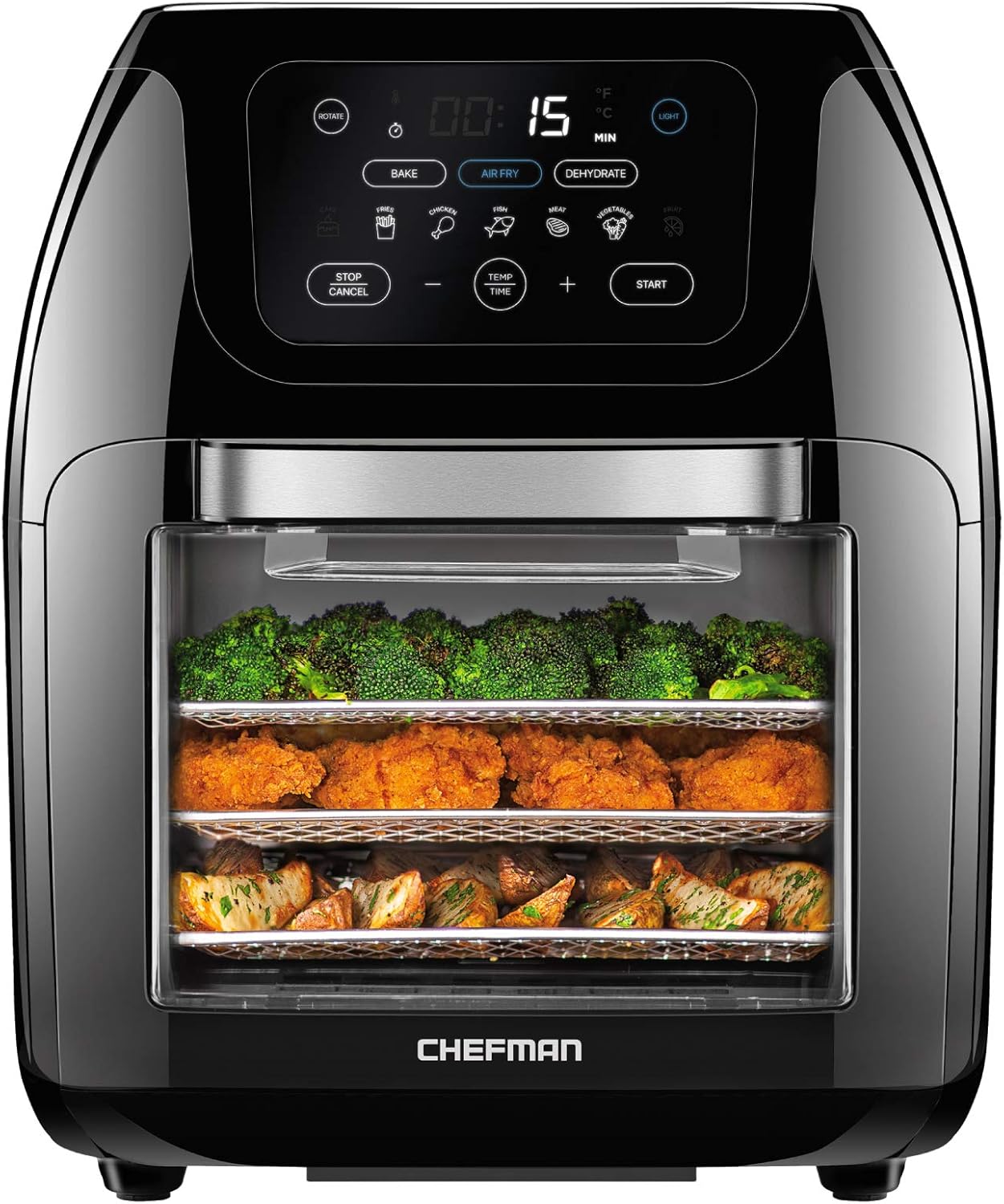
Pros
- Exceptional versatility with five cooking methods in one compact countertop unit, eliminating the need for multiple appliances
- Extra-large 10L capacity is perfect for families, entertaining guests, or preparing multiple meals at once
- Rapid air heating eliminates preheating time, getting meals on the table faster than conventional ovens
- Intuitive 17-preset touch screen makes cooking foolproof for any skill level, from beginners to experienced cooks
- Significantly healthier cooking option with 98% less oil use compared to traditional deep fryers
Cons
- Larger footprint and weight (14.2 pounds) may require dedicated counter space in smaller kitchens
- Learning curve for maximizing all five cooking functions may take time despite preset options
- Some users may find the touch screen interface occasionally less responsive than traditional buttons
The CHEFMAN XL air fryer is a comprehensive cooking solution designed for families and home cooks who want versatility without cluttering their kitchen with multiple appliances. This 10-liter capacity unit consolidates five distinct cooking methods, making it ideal for anyone serious about healthier, faster meal preparation. Whether you're air frying chicken wings, rotisserie roasting a whole chicken, dehydrating vegetables, baking pastries, or roasting vegetables, this single appliance handles it all.
Performance-wise, the rapid air circulation heating technology delivers impressively fast cooking times without the need for preheating, a significant advantage over traditional ovens. The 17 preset programs remove guesswork from cooking, allowing you to achieve professional results with a single touch. The large interior window with interior lighting is genuinely useful, letting you monitor progress without repeatedly opening the door and disrupting the cooking process. Users consistently report crispy, evenly cooked results across all cooking modes.
Build quality appears solid with stainless steel components, including the rotisserie spit, and the unit feels substantial at 14.2 pounds. The capacitive touch screen is responsive and intuitive, though it does require a learning curve to fully explore all five cooking functions. The included accessories are comprehensive, featuring three air flow racks, the rotisserie spit with retrieval tool, and a removable drip tray that simplifies cleanup significantly.
The main drawback is the unit's size and weight, which requires dedicated counter real estate. Additionally, while the presets are helpful, truly mastering all five cooking methods takes experimentation and time. Some users report that the touch screen can occasionally be unresponsive if not pressed precisely in the center of icons.
Overall, the CHEFMAN XL air fryer offers exceptional value for families and meal preppers seeking a single, versatile cooking appliance that delivers healthier results without sacrificing convenience or speed. The combination of five cooking methods, large capacity, and intuitive controls makes it a standout choice in the air fryer market.
Capacity: 10 liters, family-size XL
Power: 120 Volts, 1700 Watts
Cooking Methods: Air fry, roast, bake, dehydrate, rotisserie
Preset Programs: 17 touch screen presets
Control: Capacitive touch screen display
Accessories Included: Three air flow racks, stainless steel rotisserie spit with retrieval tool, removable drip tray
Window: Extra-large interior window with interior lighting
Dishwasher Safe: Removable drip tray and parts
Safety: cETL approved with advanced safety technology
Warranty: 1-year assurance by Chefman
Dimensions: 11.8 inches deep x 12.2 inches wide x 14.6 inches high
Weight: 14.2 pounds (6.44 kg)
Best For: Families of 4 or more, meal preppers, anyone wanting to replace multiple appliances with one versatile unit, health-conscious cooks seeking to reduce oil consumption.
Consider This Model If: You want five cooking methods in one appliance, need extra-large capacity for batch cooking, value preset programs for simplicity, and have counter space available for a larger unit.
May Not Be Ideal If: You have very limited counter space, prefer minimal learning curves with cooking appliances, or only need basic air frying without additional cooking methods.
Key Advantages Over Standard Air Fryers: The rotisserie function, dehydrator capability, and baking mode provide significantly more cooking versatility than single-function air fryers. The 10L capacity is substantially larger than most standard models, accommodating family-sized portions in a single batch.
Maintenance Tip: The removable drip tray and dishwasher-safe parts make cleanup straightforward. Regular cleaning of the interior window keeps visibility optimal during cooking.

Pros
- Versatile 4-in-1 functionality saves space and money by replacing multiple countertop appliances.
- Graphene air fryer produces healthier, crispier food with quick heating and even distribution.
- Fast steaming preserves nutrients and flavors, with six temperature settings for different foods.
- Precise temperature control oven allows baking at 10 levels from 225°F to 450°F.
- Intuitive color touch screen and preset menus make operation easy for all skill levels.
Cons
- Limited capacity at 0.9 cu.ft. may not suit large families or batch cooking.
- No dedicated pizza or broil function, which some baking enthusiasts might miss.
- Price is higher than basic microwaves, reflecting its multifunctionality.
The Midea 4-in-1 Multifunctional Microwave Steam Oven is a compact countertop solution that packs four cooking methods into one appliance: microwave, air fryer, steamer, and oven. It is designed for small households, apartment dwellers, or anyone looking to declutter their kitchen without sacrificing culinary versatility.
Standout features include the True 3D Graphene air fryer, which uses ultra-high thermal conductivity for quick, even heating and produces exceptionally crispy results with minimal oil. The dual steam tubes generate steam in 30 seconds, locking in nutrients and natural flavors. The precision oven offers 1500W upper and lower baking tubes with ten temperature settings from 225°F to 450°F, giving novice bakers greater control.
Build quality is solid with a sleek black finish and a responsive color touch screen that simplifies menu navigation. The 0.9 cu.ft. capacity (23L) is adequate for small to medium dishes, but may be limiting for large roasts or multiple trays. The included 32 auto menus and 8 additional modes (including defrost, ferment, keep warm, and cleaning cycles) make daily cooking effortless.
Potential drawbacks include the lack of a dedicated broil or pizza function, and the price point is higher than basic microwaves, though it replaces several appliances. The cleaning modes are a nice touch, but some users may find the interior needs regular attention due to steam residue.
Overall, the Midea 4-in-1 is a strong choice for those who want multifunctionality in a compact footprint. It delivers consistent performance for air frying, steaming, baking, and microwaving, making it a valuable addition to any small kitchen.
Product Dimensions: 19.7 x 18.6 x 13.5 inches
Capacity: 0.9 cu.ft. / 23L
Color: Black
Wattage: 1500W (baking tubes) / Inverter microwave with 5 power levels
Temperature Range: Oven 225°F to 450°F (10 levels); Steamer 125°F to 250°F (6 settings)
Functions: 4-in-1 (microwave, air fryer, steamer, oven) with 32 auto menus and 8 additional modes
Control Type: Color screen touch control
Brand: Midea
Product Group: Major Appliances
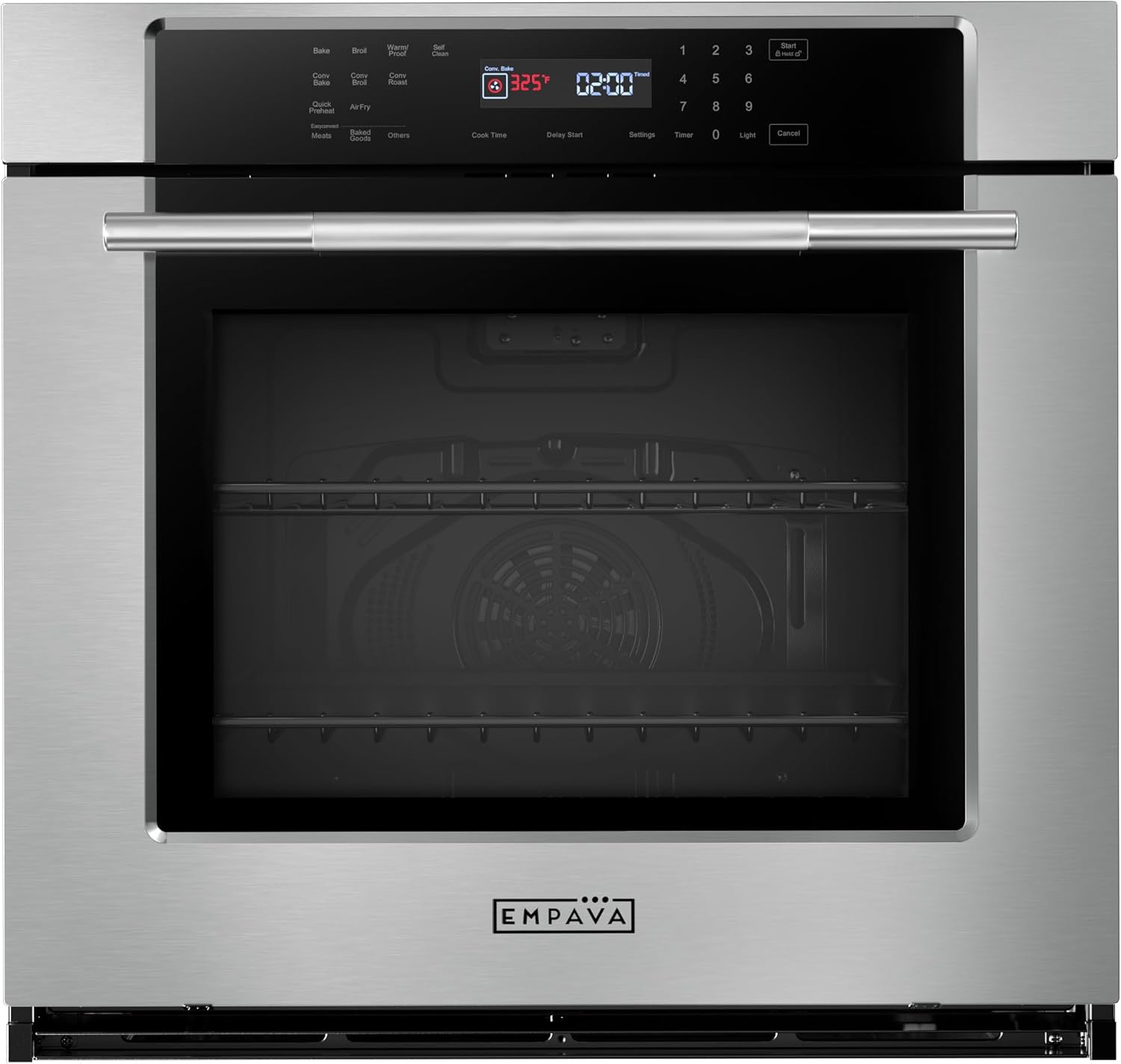
Pros
- Largest capacity among comparable Empava models at 5 cu.ft., ideal for batch cooking and large meals
- Advanced air fry technology delivers crispy results with significantly less fat, supporting healthier cooking habits
- Touch screen control with child lock provides modern convenience and essential safety features
- 10 cooking modes offer exceptional versatility for baking, roasting, broiling, and specialty techniques
- Self-cleaning function and heat-resistant materials minimize maintenance time and extend appliance lifespan
Cons
- Higher power requirement of 4800W and 25Amp circuit breaker may necessitate kitchen electrical upgrades
- Premium pricing positions this model at the higher end compared to smaller capacity Empava alternatives
- No customer reviews available yet, making it difficult to assess real-world durability and long-term performance
The Empava 30-inch electric wall oven represents a premium built-in cooking solution for homeowners and serious home chefs who demand both capacity and versatility. This appliance is designed for families who regularly prepare large meals, entertain guests, or want professional cooking capabilities without a commercial kitchen footprint.
The standout feature is undoubtedly the 5 cu.ft. interior capacity combined with 10 specialized cooking modes. The convection system excels at circulating heated air for even browning and faster preheating, while the integrated air fry technology lets you achieve crispy textures with up to 90% less oil. The precision temperature probe allows you to monitor meat doneness without opening the door, preserving heat and ensuring consistent results across multiple dishes.
Build quality is excellent, with a stainless steel and tempered glass construction designed to resist heat discoloration and withstand high-temperature cooking. The touch screen interface is intuitive and includes a child lock function, combining modern convenience with household safety. The triple-layer glass door provides visibility while maintaining heat efficiency, and the 360-degree rotisserie function adds another dimension to your cooking repertoire.
The primary consideration is the electrical requirement. This unit demands 4800W at 240V with a minimum 25Amp circuit breaker, which may require professional installation or electrical upgrades in some kitchens. Additionally, the premium positioning means this is a significant investment compared to smaller Empava models, though the expanded capacity and advanced features justify the cost for serious cooks.
The Empava 30-inch wall oven is an excellent choice for anyone seeking a high-capacity, feature-rich electric oven with modern conveniences and professional cooking performance. It delivers exceptional value for those with the space and electrical infrastructure to accommodate it, making it a worthy centerpiece for a modern kitchen renovation.
Capacity and Dimensions: 5.0 cubic feet interior capacity with dimensions of 24.7 inches L x 18.9 inches D x 18.7 inches H. Product size is 29.9 inches W x 23.5 inches D x 24.8 inches H. Cutout size is 28.6 inches W x 24.0 inches D x 27.5 inches H for built-in installation.
Power and Installation: Electric operation at 240V/60Hz with 4800 watts power rating. Requires minimum 25Amp circuit breaker. Built-in installation type with stainless steel and tempered glass construction.
Cooking Functions: 10 professional cooking modes including Bake, Broil, Convection Broil, Convection Bake, Convection Roast, Warm/Proof, Air Fry, Sabbath Mode, Delay Start, and Self/Steam Clean. Timer range extends up to 11 hours and 59 minutes with 11 temperature zones.
Key Features: Touch screen sensitive control, triple-layer glass door, 5 rack positions, 360-degree rotisserie function, precision airflow convection system, self-cleaning capability, and temperature probe for precision cooking.
Is This Oven Right for You? This 30-inch model is ideal if you regularly cook for large families, entertain frequently, or want professional-grade features in a home kitchen. The 5 cu.ft. capacity is significantly larger than standard 2.3 to 2.5 cu.ft. models, making it perfect for holiday cooking and batch meal preparation. If you only cook for one or two people, a smaller Empava model may be more practical and affordable.
Installation Considerations: Before purchasing, verify your kitchen has 240V electrical service and a 25Amp circuit breaker available. Built-in installation requires proper cutout dimensions (28.6 inches W x 24.0 inches D x 27.5 inches H) and professional installation is recommended to ensure safe operation and maintain manufacturer warranty coverage.
Comparing to Alternatives: This model stands apart from other Empava wall ovens primarily through its larger capacity and higher wattage (4800W vs. 2800-3200W on smaller models). While smaller models are more affordable and require less electrical power, this unit offers superior cooking speed, larger batch capacity, and more advanced convection performance for serious home cooks willing to invest in premium features.
Long-term Value: The stainless steel construction and heat-resistant materials are engineered for durability and years of reliable performance. The self-cleaning function reduces maintenance time and effort, while the 10 cooking modes provide exceptional versatility that justifies the premium price for those who cook frequently and value culinary precision.

Pros
- Versatile with air fry, steam, and combo modes for different cooking styles
- Touch screen control is intuitive and easy to use
- Dishwasher safe parts make cleaning simple and quick
- Interior lights allow you to check food without losing heat
- Water shortage reminder adds a layer of safety during steam cooking
Cons
- Brand is less established, which may affect long term reliability perception
- No customer reviews yet to confirm real world performance
- Capacity is relatively small, suitable for 2 4 people but not larger gatherings
The Part Synergy air fryer brings a fresh approach to countertop cooking with three distinct modes: air fry, steam, and combo. This appliance is designed for home cooks who want to expand their culinary repertoire without cluttering the kitchen with multiple gadgets. Whether you are crisping fries, steaming vegetables, or combining both methods for juicy meats, this unit aims to deliver convenience and versatility.
Standout features include a touch screen control panel that simplifies temperature and time adjustments, and interior lights that let you monitor progress without opening the basket. The dishwasher safe oil pan, rack, and tray make cleanup a breeze, a major plus for busy households. The water shortage reminder is a thoughtful safety addition, ensuring you never accidentally run the steam function dry.
Build quality feels solid with a black finish that fits most kitchen decors. The 0.53 cubic foot capacity is adequate for small to medium meals, though larger families may find it limiting. The temperature range from 176 to 536 degrees Fahrenheit covers low and slow cooking as well as high heat searing, offering flexibility for recipes from baked goods to roasted meats.
Potential drawbacks include the lack of customer reviews, making it hard to gauge long term durability. The brand Part Synergy is not as widely recognized as established names, which might concern some buyers. Additionally, the capacity is modest; if you regularly cook for five or more, you may need to cook in batches.
Overall, the Part Synergy air fryer is a compelling option for those seeking a multi functional countertop cooker with steam capability. Its thoughtful features like interior lights and dishwasher safe parts enhance everyday use. If you are willing to try a newer brand and your cooking needs are moderate, this appliance offers good value for its price point.
Color: Black
Dimensions: 15.7 x 14.8 x 13.9 inches
Weight: 17.6 pounds
Capacity: 0.53 Cubic Feet
Temperature Range: 176 to 536 degrees Fahrenheit
Control Type: Touch Screen
Cooking Modes: Air Fry, Steam, Combo
Dishwasher Safe Parts: Oil Pan, Rack, Tray
Additional Features: Interior Lights, Water Shortage Reminder

Pros
- Exceptional heating precision with 5-fan speed system ensures evenly cooked dishes with perfect texture
- PFAS-free ceramic coating eliminates health concerns while offering better durability and heat resistance
- Remarkably quiet performance under 53dB makes this air fryer suitable for any kitchen environment
- Dishwasher-safe basket and crisper tray save significant cleanup time after cooking
- Wide temperature range from 90°F to 450°F enables diverse cooking applications from proofing dough to high-heat crisping
Cons
- 6-quart capacity, while generous, may require cooking in batches for larger households of 8+ people
- Square basket design, though space-efficient, has slightly less surface area than round models for certain foods
- Preheat function requires manual selection, adding one extra step compared to fully automatic models
The Cosori TurboBlaze is a premium 9-in-1 air fryer designed for families and cooking enthusiasts who demand both performance and health-conscious cooking. With its 6-quart capacity and 1725W power output, this model bridges the gap between compact personal fryers and commercial-grade equipment, making it perfect for busy households, meal preppers, and anyone seeking versatile kitchen appliances.
What truly sets this fryer apart is its TurboBlaze Technology, featuring a powerful 3600 rpm fan combined with a sophisticated 5-speed fan control system. The temperature range of 90°F to 450°F provides remarkable versatility, from gentle dough proofing to aggressive crisping. Users consistently report achieving restaurant-quality crispiness with juicy interiors, and the PFAS-free ceramic nonstick coating eliminates health concerns associated with traditional non-stick surfaces while delivering superior durability and heat resistance.
The design prioritizes both functionality and user experience. The square basket maximizes usable cooking space while maintaining a compact footprint, and the whisper-quiet operation under 53dB sets this model apart from competitors that often exceed 60-65dB. The dishwasher-safe components eliminate tedious hand-scrubbing, and the customizable preheat function offers flexibility for different cooking scenarios.
The primary consideration is that the 6-quart capacity may require batch cooking for households with 8 or more members. Additionally, the square basket design offers slightly less surface area than traditional round models for certain foods like whole chickens. The manual preheat selection adds one extra step compared to fully automated alternatives, though many users appreciate this control.
The Cosori TurboBlaze represents an excellent investment for health-conscious cooks seeking reliable, versatile performance with premium build quality. The combination of advanced heating technology, PFAS-free materials, exceptional noise control, and intuitive functionality delivers genuine value that justifies the investment for families and serious home cooks.
Capacity: 6-quart square basket
Power: 1725W
Temperature Range: 90°F to 450°F
Fan Speed: 5 adjustable levels, 3600 rpm maximum
Cooking Functions: 9-in-1 (air fry, roast, bake, broil, dry, frozen, proof, reheat, keep warm)
Coating: PFAS-free ceramic nonstick
Noise Level: Less than 53dB at maximum fan speed
Dishwasher Safe: Basket and crisper tray
Oil Reduction: Up to 95% less oil than traditional deep frying
Safety Features: Safety lock mechanism
Included: Recipe cookbook with cooking charts
Who Should Buy This: The Cosori TurboBlaze is ideal for health-conscious families, meal prep enthusiasts, and home cooks who value both performance and safety. If you prioritize PFAS-free cookware, appreciate quiet appliances, and want versatile 9-in-1 functionality, this fryer delivers exceptional value.
Who Might Look Elsewhere: If you have a household of 8+ people requiring simultaneous cooking, consider larger capacity models. If you prefer fully automatic operation with zero manual selection, you may prefer simpler models with preset functions.
Key Considerations: The 6-quart capacity suits most families of 4-6 people comfortably. The PFAS-free ceramic coating justifies the investment for health-conscious buyers. The 5-speed fan system offers superior control compared to single-speed competitors. The included recipe book with in-house chef and registered dietitian input adds genuine practical value.
Long-Term Value: The durable ceramic coating resists degradation better than traditional non-stick surfaces, potentially extending the fryer's lifespan. The dishwasher-safe components reduce maintenance burden over years of regular use. The 1725W power output ensures consistent performance without the electrical limitations of lower-wattage models.
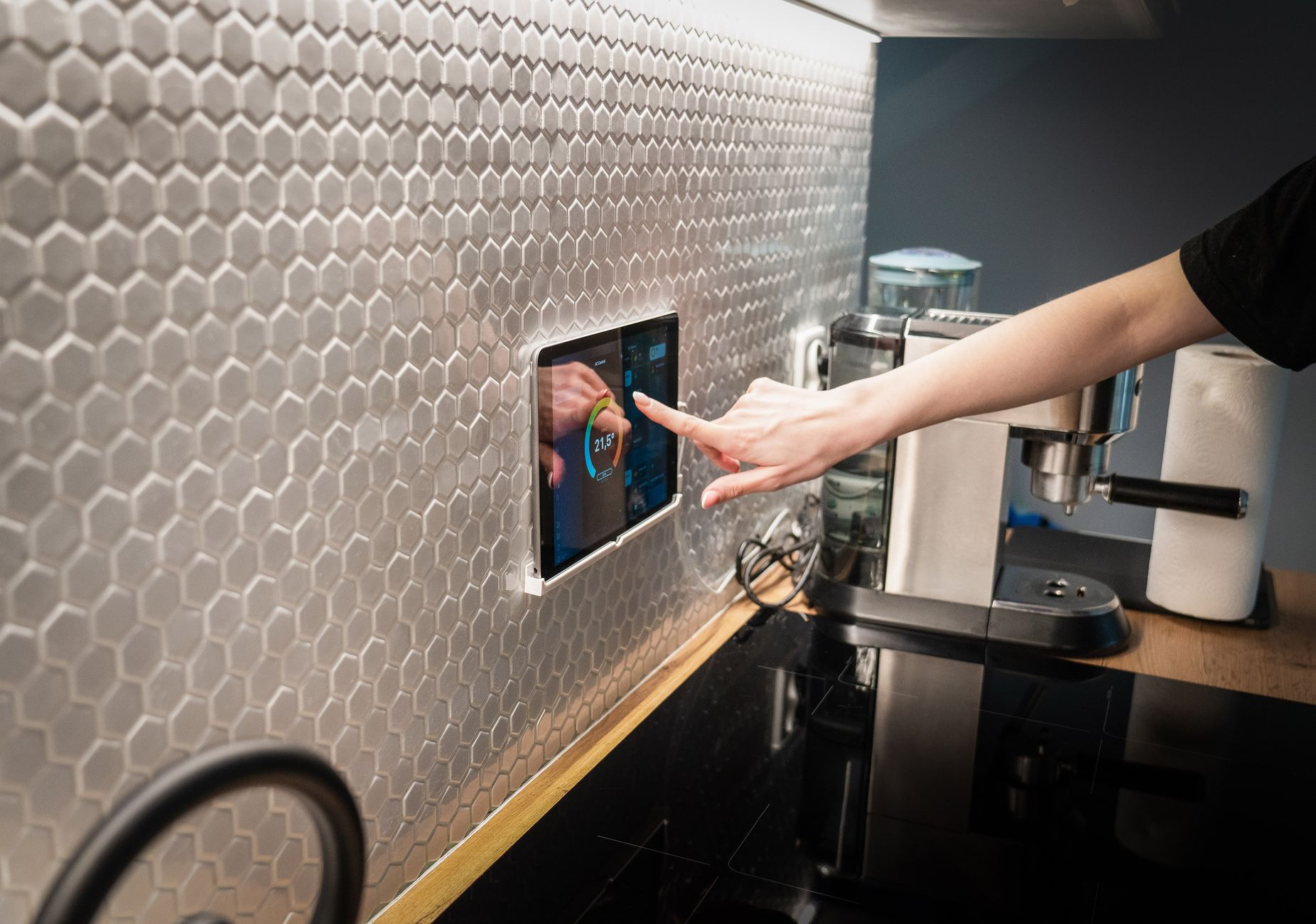
Control Panel Lock Is Engaged
Many air fryer models include a child lock or panel lock feature that can be activated accidentally. When enabled, the touch screen will appear completely unresponsive. This is often the simplest cause of an air fryer touch screen not working.
Look for a padlock icon on the display or a dedicated lock button on the control panel. To unlock, press and hold the lock button for 3 to 5 seconds, or follow the specific sequence in your user manual. Once unlocked, the screen should respond normally.
Power Supply Issues
A dead or unresponsive touch screen can also stem from a power problem. The air fryer may be plugged into an outlet that is not supplying power, or the unit itself may have tripped an internal safety breaker.
Test the outlet by plugging in another appliance, and check that the power cord is fully inserted into both the air fryer and the wall. If the screen is completely dark, the air fryer may have experienced a power surge that blew a fuse. Unplug it for 10 minutes, then plug it back in to reset the internal electronics.
Grease and Food Residue on the Touch Screen
Capacitive touch screens rely on the electrical conductivity of your finger. A buildup of grease, oil, or food particles can create an insulating layer that prevents the screen from registering touches.
Wipe the screen gently with a soft, lint-free cloth slightly dampened with water or a mild glass cleaner. Avoid using abrasive pads or harsh chemicals that could scratch or damage the surface. Clean the entire control panel area, including any crevices where residue might collect.
Software Glitch or Temporary Error
Like any electronic device, an air fryer can experience a temporary software glitch that freezes the touch screen. This is often caused by a rapid power fluctuation or a random error in the control board’s firmware.
Performing a hard reset usually resolves the issue. Unplug the air fryer from the wall outlet, wait 30 to 60 seconds, then plug it back in. If the screen remains unresponsive, try pressing the power button for 10 seconds while the unit is unplugged to drain any residual charge.
Moisture or Condensation Inside the Control Panel
Condensation can form inside the touch screen assembly if the air fryer is stored in a humid environment or if steam from cooking enters the control panel area. This moisture can cause erratic behavior or complete unresponsiveness.
Allow the air fryer to sit unplugged in a dry, warm room for several hours to let any internal moisture evaporate. You can also place a silica gel pack near the control panel (but not inside the cooking chamber) to help absorb humidity. Avoid using the air fryer in a steamy kitchen or near a dishwasher.
Hardware Failure of the Touch Screen or Control Board
If none of the above steps resolve the issue, the problem may be a faulty touch screen panel, a damaged control board, or a loose internal ribbon cable. These hardware failures are less common but do occur, especially in older units or after physical impact.
Inspect the screen for cracks, dents, or discoloration. If the air fryer is still under warranty, contact the manufacturer for a replacement or repair. For out-of-warranty units, the cost of a new control board may exceed the value of the appliance, making replacement a more practical option.
How to Fix an Air Fryer Touch Screen That Isn’t Working
- Check and disable the child lock feature by holding the lock button for 3 to 5 seconds.
- Verify the air fryer is plugged into a working outlet and reset the unit by unplugging it for 10 minutes.
- Clean the touch screen gently with a soft, dry cloth to remove grease and residue.
- Perform a hard reset by unplugging the air fryer for 30 to 60 seconds, then plugging it back in.
- Allow the air fryer to dry out in a warm room if condensation is suspected.
- Contact the manufacturer for warranty service if the screen is physically damaged or the control board is faulty.
If your air fryer’s touch screen is beyond repair, you may want to explore a replacement. Our air fryer size comparison guide can help you find a model that fits your kitchen and cooking habits.
Frequently Asked Questions
How do I unlock the control panel on my air fryer?
Look for a lock icon on the screen or a dedicated button labeled “Lock” or with a padlock symbol. Press and hold that button for 3 to 5 seconds until the icon disappears. If you cannot find the lock, consult your user manual for the specific unlock sequence.
Can I use a screen protector on an air fryer touch screen?
It is not recommended. Most air fryer touch screens are not designed to have an additional layer, and a screen protector can reduce sensitivity or trap moisture and grease underneath. Regular cleaning with a soft cloth is sufficient to protect the surface.
Why does my air fryer touch screen work intermittently?
Intermittent issues often point to a loose internal connection, a failing control board, or partial grease buildup. Try cleaning the screen and performing a hard reset first. If the problem persists, it may be a hardware defect that requires professional repair or replacement.
What does an error code on the air fryer touch screen mean?
Error codes vary by manufacturer, but common ones indicate overheating, a sensor failure, or a communication error between the board and the screen. Check your user manual for the specific code definition. A simple reset often clears temporary error codes.
Is it worth repairing a broken air fryer touch screen?
For most budget to mid-range air fryers, the cost of replacing the touch screen or control board can be close to the price of a new unit. If the air fryer is under warranty, claim service. Otherwise, replacing the appliance is often more economical.
A dead touch panel is rarely worth the cost of a board swap, and our roundup of affordable air fryers lists solid, budget-friendly replacements.
Closing
When your air fryer touch screen is not working, the fix is usually a simple matter of unlocking the panel, cleaning the screen, or resetting the power. If you decide to replace your air fryer, our air fryer size comparison guide can help you choose the right capacity for your kitchen.